Master Your Day with an Editable 24 Hour Planner Template
In the relentless pace of modern life, where professional deadlines, creative projects, and personal commitments collide, a simple tool can transform chaos into clarity. The 24 Hour Planner - Canva Template is not just another printable; it’s a foundational system designed for those who need to visualize and command their entire day, hour by hour. For entrepreneurs juggling client calls and product development, freelancers balancing multiple gigs, or students managing coursework and side projects, this planner provides the structural framework to allocate time intentionally, ensuring priorities are not lost in a blur of activity.
Beyond a Printable: A Fully Customizable Productivity Engine
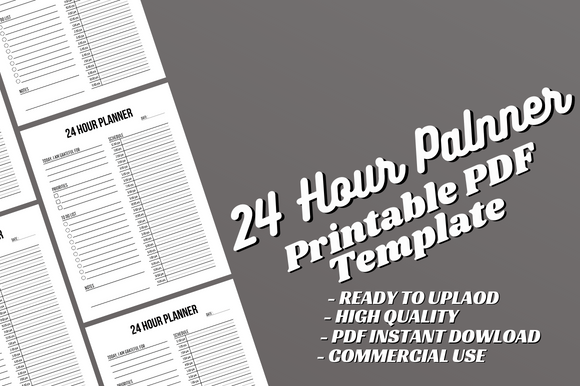
What sets this specific template apart is its dual nature. You receive a complete PDF file ready to upload, a 120-page professional document formatted to 8.5x11 inches, print-ready and KDP-tested. But more importantly, you gain access to the fully editable Canva source file. This is the key to true ownership. Instead of being constrained by a static layout, you have the power to adapt the planner to your unique workflow. Perhaps you need larger blocks for morning deep work sessions or specific sections for tracking hydration or mindfulness breaks. With the editable interior, you can change fonts, colors, headings, and layout elements directly within Canva’s intuitive platform, tailoring the tool until it feels like a natural extension of your thought process.
The Practical Power of Hour-by-Hour Visualization
The core benefit of a 24-hour layout is its uncompromising realism. A typical daily planner might offer a to-do list or broad morning/afternoon segments, but it often glosses over the finite nature of time. This template forces a constructive confrontation with your schedule. By mapping tasks, appointments, and even leisure onto a 24-hour grid, you create a visual contract with yourself. This is particularly valuable for professionals who bill by the hour, creators guarding their creative time, or anyone recovering from a pattern of overcommitment. It turns abstract goals—“finish the report,” “work on the novel”—into tangible appointments with yourself, significantly increasing the likelihood of execution.
Consider a common scenario: a small business owner planning a product launch. Marketing emails, social media posts, final quality checks, and team meetings all demand attention. Using the 24 Hour Planner KDP interior template, they can allocate two hours in the morning for focused creative work on assets, slot a 30-minute block for social media engagement after lunch, and reserve the late afternoon for administrative coordination. This visual plan not only improves efficiency but also reduces the cognitive load of constantly deciding “what to do next,” freeing mental energy for higher-level strategic thinking.
Who Benefits Most from This Editable Template?
The flexibility of the tool means its utility spans several audiences.
- Content Creators & Marketers: For bloggers, video producers, or social media managers, time is the raw material. This planner helps block out content creation batches, editing sessions, and engagement periods, ensuring a consistent output without burnout.
- Educators & Trainers: Lesson planning, grading, and student consultations can consume a day. An editable 24-hour schedule allows for color-coding different activities (lecture prep vs. administrative work) and visually balancing workload across the week.
- KDP Publishers & Hobbyists: The template itself is a product for this group. The provided high-quality print-ready PDF and editable Canva file mean they can swiftly customize and upload a professional interior to Amazon KDP or similar platforms, accelerating their publishing workflow. The note that it’s an “interior only” reminds users to pair it with a cover, a crucial consideration for a complete product.
- Project-Based Freelancers: Juggling multiple clients requires strict time partitioning to avoid scope creep and ensure timely delivery. A customized 24-hour planner can be themed per client project, providing clear daily boundaries.
Implementing the Template for Tangible Outcomes
To move from simply having the tool to actually improving results, it’s helpful to start with a week-long experiment. Use the editable Canva file first to make minor adjustments that suit your style—perhaps increasing the font size for readability or adding a small “Today’s Focus” quote box at the top. Then, print a week’s pages from the complete PDF file. The physical act of writing into the hourly blocks can reinforce commitment. For digital users, the PDF can be used in note-taking apps for similar effect.
The goal is not to fill every hour, but to create a realistic map that includes buffers, transitions, and breaks. A common pitfall in productivity is scheduling every minute, leading to frustration when reality intrudes. A thoughtful user of this template will learn to schedule “flex hours” for unexpected tasks and clearly label downtime, understanding that rest is a scheduled priority, not a time failure. Over time, this practice can sharpen decision-making about what to undertake, as the visual limitation of hours makes it clear that accepting a new project means displacing an existing commitment.
Considerations and Optimal Use
While the 24 Hour Daily Planner template is powerfully flexible, it’s important to assess fit. For individuals whose days are largely reactive or driven by external appointments (like some healthcare or service roles), a more detailed weekly or monthly overview might be a better primary tool, with this 24-hour planner reserved for particularly complex or self-directed days. Furthermore, the template’s strength is in daily tactical planning; it complements but does not replace long-term goal-setting systems.
The specification of no bleed is a technical point that matters for self-publishing. It means the design is safe for standard printing without requiring trimming, which simplifies the production process for KDP users. This attention to detail ensures the product is truly “ready to upload,” minimizing technical hurdles.
Ultimately, the value of this Canva editable interior and its accompanying PDF lies in empowerment. It provides a professional structure—the 120-page framework with clean hourly divisions—but hands you the keys to modify it. This balance between guided design and personal freedom is what can turn a generic planner into a personalized productivity companion. It supports the move from feeling overwhelmed by time to feeling in command of it, hour by hour, task by task, day by day.